Date: 2026.07.17 Click: 3
If you enjoy making things by hand and want something easy to use, a manual die cutting machine is best for you. However, if you're looking for a die cutting machine for sale that can handle bigger or more complex projects, electronic machines can save you time and effort. Many people started using electronic machines during the pandemic because they appreciated how these machines could create detailed designs. Manual machines are great for simple crafts and are typically less expensive, but they can become tiring if used for extended periods. Before you search for a die cutting machine for sale, consider the size of your projects, your comfort level with technology, and your budget. This beginner’s guide will assist you in selecting the best option for your crafting needs.
Key TakeawaysManual die-cutting machines work well for simple crafts. They are good for people who like to use their hands. These machines are easy to use. They do not cost a lot of money.
Electronic die-cutting machines have more features. They can do many different things. These machines can cut over 100 types of materials. They make detailed designs fast.
Think about your project size and how hard it is. Manual machines are best for small projects. Electronic machines are better for big or tricky tasks.
Make sure to plan your budget before you buy. Manual machines cost less money. Electronic machines can cost more, depending on what they can do.
Look at how you like to craft. If you like to work with your hands, pick a manual machine. If you like using technology and want things done fast, choose an electronic machine.
Die-cutting machines come in different shapes and sizes. You can find them in schools, craft rooms, or small shops. Each die cutting machine helps you cut shapes, letters, or patterns from many materials. Let’s check out the main types of die cutting machines and see what makes each one unique.
|
Type of Die-Cutting Machine |
Structure |
Advantages |
Applications |
|---|---|---|---|
|
Flat-Bed Die-Cutting Machines |
Flat bed holds material; die moves up/down |
Great for thick materials, precise |
Boxes, covers, packaging |
|
Rotary Die-Cutting Machines |
Rotating cylinder die; material feeds through |
Fast, good for big batches |
Stickers, flexible packaging, labels |
|
Clicker Die-Cutting Machines |
Small area; single-stroke press |
Precise for small pieces |
Shoes, textiles, detailed cuts |
A manual die cutting machine uses a handle or lever. You put your material and a metal die between two plates. Then you turn the handle. The machine presses the die into the material and cuts out your shape. Manual die cutting machines work best with soft things like paper, cardstock, felt, and thin fabric. It can be hard to cut thick or tough materials with a manual die cutting machine. These machines are easy to use and do not need electricity or a computer. You get to use your hands, which many crafters enjoy.
Electronic die cutting machines, also called digital die cutting machines, use motors and software to cut shapes. You connect them to a computer or use a built-in screen. You can pick a design, change the size, and let the machine do the work. Many digital die cutting machines can cut more than 100 materials, even thick ones. Some popular electric die cutting machines are the Silhouette Cameo 3, Brother ScanNCut, and Cricut Explore Air 2. These machines have features like Bluetooth, touch screens, and built-in designs. Here is a quick look at what some digital models can do:
|
Feature |
Silhouette Cameo 3 |
Brother ScanNCut |
Cricut Explore Air 2 |
|---|---|---|---|
|
Cuts various materials |
Yes (over 100) |
Yes (up to 2mm thick) |
Yes |
|
Built-in software |
Silhouette Studio |
Yes (631 designs) |
Cricut Design Space |
|
Bluetooth connectivity |
Yes |
No |
Yes |
|
Dual carriage |
Yes |
No |
No |
|
Print and Cut technology |
Yes |
No |
No |
|
LCD touch screen |
No |
Yes |
No |
You get more choices with a digital die cutting machine. You can make detailed designs, use digital files, and even cut out photos. If you like using technology and want to try new things, a digital die cutting machine could be your best choice.
Key Differences Between Manual and ElectronicWhen you look for a die-cutting machine, you may wonder how each kind works for different projects. Manual machines cost less at first. They are good for basic shapes and embossing. You use your hands and can make 3D effects with embossing folders. If you want to cut simple designs from paper, felt, or thin fabric, manual machines work well.
Electronic machines give you more choices. You can change digital files and make custom shapes. These machines can cut over 100 materials. Sometimes, they have trouble with very detailed cuts, especially with tough materials like aluminum cans. You might need to run the machine more than once for hard cuts. If you want to make detailed designs or use many materials, electronic machines are a smart pick.
Here’s a quick look at how each machine handles versatility and die types:
Manual die-cutting machines cost less and are easy to use.
It can be hard to find the right die size for some projects.
Manual machines let you emboss, which adds texture to crafts.
Electronic machines have advanced features and are good for detailed designs.
Electronic machines can cut many materials, but tough cuts may need extra tries.
You can make custom shapes and change sizes easily with electronic machines.
If you like trying different materials and want to do complex projects, electronic machines are more flexible. If you like simple crafts and basic shapes, manual machines are a good choice.
How you use a die-cutting machine changes your crafting experience. Manual machines give you a hands-on feel. You turn a handle, press plates, and see your shape appear. Many crafters like this process. You control each step and feel the material as you work.
Electronic machines give you a digital experience. You pick a design on a screen, change the size, and let the machine do the work. You do not need physical dies, and you can cut shapes with high precision. If you like technology and want to save time, digital machines make things easier.
Let’s compare the tactile and digital experiences:
|
Aspect |
Digital Cutting |
Die-Cutting |
|---|---|---|
|
Precision |
High precision and detailed cuts |
Less precision and fewer cut options |
|
Tooling |
No need for hard tooling |
Needs custom steel rule dies |
|
Speed |
Fast for small batches |
Very fast for big jobs |
|
Material Versatility |
Works with many materials |
Fewer material choices |
|
Setup Time |
Quick setup |
Takes longer to change dies |
You may like the tactile experience if you enjoy feeling the material and watching your craft come to life. If you want to work fast and try new designs, the digital experience is better for you.
Cost of a Die Cutting MachineTip: Think about how you like to craft. Do you enjoy hands-on work, or do you prefer using technology to finish projects faster? Your answer will help you pick the right die-cutting machine.
When you shop for a die cutting machine, you will notice a big range in prices. Some machines cost less than a fancy dinner, while others cost as much as a car. You want to know what fits your budget before you buy.
Here’s a quick look at the average prices for different types of die-cutting machines:
|
Type of Machine |
Price Range |
|---|---|
|
Manual trimmers |
Under $60 |
|
Mid-tier die-cutting machines |
$80 - $300 |
|
Fully automatic and industrial machines |
$500 - $5,000+ |
|
Entry-level automatic flatbeds |
$15,000 - $40,000 |
|
Mid-range European/North American systems |
$40,000 - $100,000 |
|
High-speed rotary die cutters |
$100,000 - $250,000+ |
If you want an affordable die cutting machine for home crafts, you can start with a manual trimmer or a mid-tier model. These work well for most paper and fabric projects. If you run a business or need to cut lots of shapes every day, you might look at the higher-end machines. Most crafters find what they need in the $80 to $300 range.
Tip: Set your budget before you shop. You can find a die-cutting machine that matches your needs and wallet.
Buying a die cutting machine is just the start. You will need to think about extra costs. Manual machines need new dies and cutting plates. These can add up if you like to try new shapes. Electronic machines often need special mats, blades, and sometimes software. You may also pay for design files or subscriptions.
Here’s a simple list of ongoing costs:
Replacement dies or blades
Cutting mats
Design files or software
Maintenance or repairs
You can save money by taking care of your die-cutting machine and shopping for deals on supplies. Always check what comes in the box before you buy. Some machines include starter kits, which help you get started without extra spending.
How to Use a Die Cut Machine
You might wonder how to use a die cut machine if you have never tried one before. Manual machines are easy to use and perfect for beginners. You get to control each step with your hands. Here’s how you can start:
Gather your die-cutting machine, plates, and paper.
Measure your paper so it fits over the die.
Cut the paper to fit through the opening of the machine.
Place the plates on top and bottom of the die with the paper in between.
Roll everything through the die-cutting machine using the handle.
Remove your paper or material from the die.
Use a poking tool to get out any small, delicate pieces.
You will notice that manual machines feel very user-friendly. You do not need to learn any software or connect to a computer. You just turn the handle and watch your shape appear. Many crafters love this hands-on process.
Tip: Manual machines are easy to use and help you learn the basics of die cutting quickly.
Electronic die-cutting machines look high-tech, but you can still learn how to use them. These machines use motors and software to cut shapes for you. You pick a design on a screen or computer, load your material, and press a button. The machine does the rest.
Here’s a simple overview:
Choose or upload your design.
Place your material on the cutting mat.
Load the mat into the machine.
Adjust settings for your material.
Press start and let the machine cut.
Remove your finished shape.
Electronic machines are also easy to use once you get the hang of them. They can feel tricky at first because you need to learn the software and settings. If you like technology, you might enjoy the extra features.
Project SuitabilityNote: Manual die-cutting machines are more beginner-friendly because they are less complex and give you a hands-on experience. Electronic machines automate the process, which can be overwhelming for beginners.
When you start crafting, you might wonder what machine you need. Manual machines are good for easy shapes like circles and stars. You can use them to make cards or banners. You turn the handle and watch your shape appear. This makes crafting feel fun and simple.
If you want to make detailed shapes, electronic machines help a lot. You can cut out words or tiny flowers with just a few clicks. Electronic machines let you use digital files for your own designs. This makes your crafts look special and professional.
Tip: If you like making simple crafts, use a manual machine. If you want to make fancy art or invitations, try an electronic machine.
Project size is important when picking a die-cutting machine. For small projects, like a few cards or stickers, manual or punch die cutters work well. These machines are small and cost less money. If you want to cut lots of shapes or big materials, you need a bigger machine.
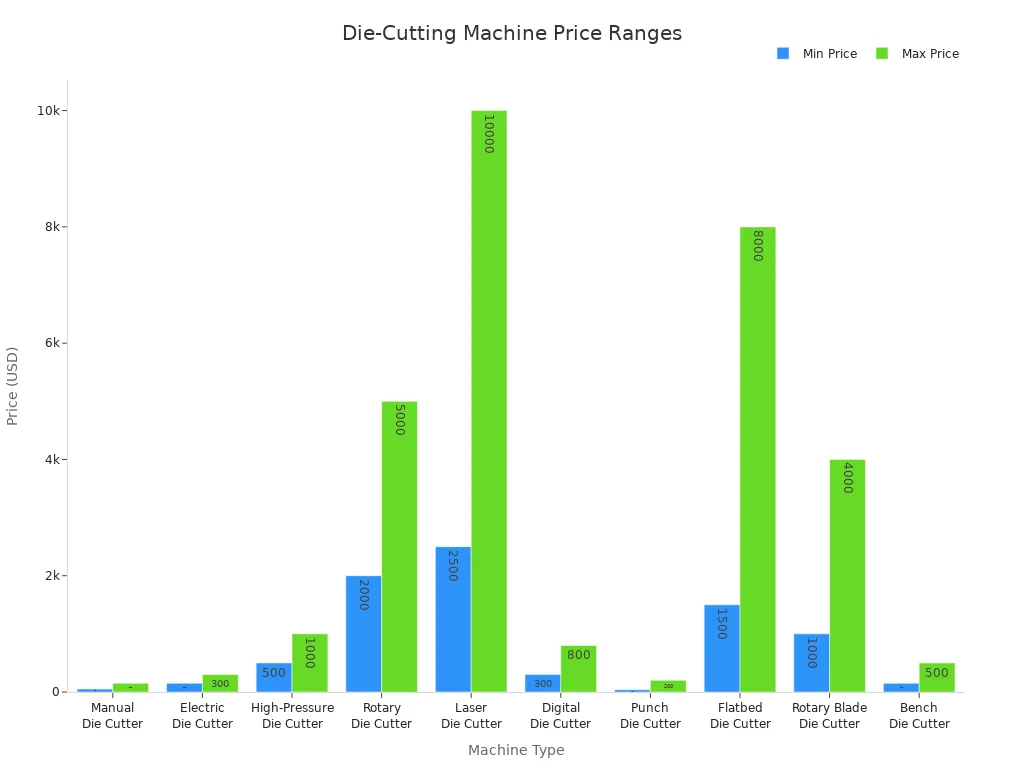
Here’s a quick chart showing which machines fit different project sizes:
|
Machine Type |
Best For |
Cutting Capacity |
Price Range |
|---|---|---|---|
|
Manual Die Cutter |
Hobbyists and crafters |
Up to 12 inches |
$50 - $150 |
|
Electric Die Cutter |
Small businesses and professionals |
Up to 12 inches |
$150 - $300 |
|
High-Pressure Die Cutter |
Commercial users for thick stock |
Up to 18 inches |
$500 - $1000 |
|
Rotary Die Cutter |
Large production runs |
Customizable |
$2000 - $5000 |
|
Laser Die Cutter |
High-detail projects |
Up to 24 inches |
$2500 - $10000 |
|
Digital Die Cutter |
Crafting and design projects |
Up to 14 inches |
$300 - $800 |
|
Punch Die Cutter |
Small-scale projects |
Custom shapes |
$40 - $200 |
|
Flatbed Die Cutter |
Industrial applications |
Large sheets |
$1500 - $8000 |
|
Rotary Blade Die Cutter |
Textile and paper industries |
Variable sizes |
$1000 - $4000 |
|
Bench Die Cutter |
Small space applications |
Up to 6 inches |
$150 - $500 |
Both manual and electronic machines help you craft more. Electronic machines save time and cut many shapes fast. Manual machines take more work, so they are best for small jobs. If you need to cut hundreds of shapes, electronic machines finish faster.
Special Features and ConsiderationsNote: Think about how big your project is and how many shapes you need. This will help you choose the best machine for your crafts.
Die-cutting tools can do more than just cut shapes. Many machines let you try cool crafting tricks, like embossing. Embossing makes your paper or fabric feel bumpy and look special. You press a pattern into your project to make it stand out. Some manual die-cutting tools, like the Spellbinders Platinum, work with both 2D and 3D embossing folders. You can use etched dies, thin metal dies, or steel rule dies with these machines. The CraftGenes Die Cutting Machine helps you cut paper crafts up to 6 inches wide. It works well and lets you switch tools for different effects.
|
Machine Name |
Features |
|---|---|
|
Spellbinders Platinum Die Cutting |
Supports etched dies, thin metal dies, and steel rule dies; accommodates 2D and 3D embossing folders. |
|
CraftGenes Die Cutting Machine |
All-in-one solution for precision; accommodates paper crafts up to 6 inches wide. |
|
Spellbinders Platinum Die Cutting |
Reliable performance; adaptable to various cutting and embossing tools. |
Electronic die-cutting tools have new features. You can use Bluetooth to control them without wires. Smart cutting technology helps you make neat cuts. New machines can handle lots of materials and designs. These features make crafting easier and let you be creative in new ways.
Smart features make crafting simple.
New ideas help both hobby crafters and pros.
You can try new art projects with modern die-cutting tools.
Think about where you will use your die-cutting tools. Manual machines are small and easy to move. You can store them in tight spaces. They are quiet, so you can craft without bothering anyone. Electronic die-cutting tools come in different sizes. Some are big and harder to move. They can be louder, especially when cutting thick things.
|
Feature |
Manual Die-Cutting Machines |
Electronic Die-Cutting Machines |
|---|---|---|
|
Space Requirements |
Generally compact |
Varies in size |
|
Portability |
Highly portable |
Less portable due to size |
|
Noise Levels |
Typically quieter |
May vary, but can be noisier |
Manual die-cutting tools are good if you want to craft in many places. Electronic machines are better if you have a special craft room. Check the size and noise before you buy. This helps you pick the best die-cutting tools for your home or studio.
Buying a Die Cutting Machine for SaleTip: Think about your space and how much you move your die-cutting tools. Pick what matches your crafting style.
Shopping for a die cutting machine for sale can feel overwhelming, but you can make it simple by focusing on a few key features. First, check if the machine works with different materials like paper, fabric, or thin plastic. You want a machine that fits your favorite projects. Next, look at the cutting capacity. Some machines handle just one layer, while others can cut through several at once. If you want easy crafting, pick a model with simple controls or a digital screen for more complex designs.
Here’s a quick checklist to help you:
Versatility—Can it cut paper, fabric, and more?
Cutting capacity—Does it handle single or multi-layer cuts?
Ease of use—Are the controls simple or is there a digital interface?
Compatibility—Does it work with design software?
Durability—Is it built to last for many projects?
Precision—Does it cut clean edges for a professional look?
Tip: Try testing the tension settings and see if you can add extra tools for more creative options.
When you look for the best die-cutting machine, think about your space, budget, and the types of crafts you love. Some crafters prefer compact machines because they are easy to store and move. Others want a die cutting machine for sale that works with special materials. Prices can range from $100 to over $500, so decide what you need before you shop.
Here’s a table to help you compare:
|
Criteria |
Details |
|---|---|
|
Size and Portability |
Compact machines are easy to store and move. |
|
Material Compatibility |
Some machines work better with certain materials. |
|
Budget Considerations |
Prices vary—set a budget to avoid overspending. |
|
User Experience |
Check reviews to see how easy and fun the machine is to use. |
You might see a popular die cutting machine like the Gemini Junior, which has an auto-feed and cuts detailed shapes. The Big Shot Express uses a push-button feed and works with many die types. If you want something small, the Tim Holtz SideKick is portable and comes with starter dies.
When you shop for a die cutting machine for sale, consider both manual and electronic options. The best die-cutting machine for you depends on your projects, your space, and your budget. Take your time, read reviews, and pick the one that makes crafting fun and easy.
Making Your ChoicePicking between manual and electronic die-cutting machines can seem hard. You can make it easier by thinking about what you like to make. Here are some quick tips to help you choose:
Type of Projects: Think about what you want to make. Manual machines are good for simple crafts. Electronic machines are better for big or detailed projects.
Material Compatibility: Check if the machine works with your favorite materials. These could be paper, vinyl, or fabric.
Cutting Size: Some machines cut only small pieces. Others can cut bigger sheets.
Accuracy: If you want neat cuts, look for machines that cut very close. This helps you waste less and makes your crafts look nice.
Versatility: Many crafters like machines that cut many materials. This helps you try new things and get more use from your machine.
Ease of Use: If you want something simple, pick a machine that is easy to use. About 65% of new users stop using machines that are too hard.
Speed: Fast machines help you finish crafts quickly. This is good if you make things often.
User Experience: Good instructions and easy buttons are important. Most crafters like machines that are fun and simple to use.
Budget: Decide how much you want to spend. Remember to think about the first price and the cost for supplies.
📝 Tip: Don’t just look at how much the machine costs. Think about how often you will use it and what features you really need.
Before you buy, ask yourself these questions to help you pick the right die-cutting machine:
What do I want to make? (Cards, boxes, crafts, or something else?)
How many things will I make each day or week?
Do I want a manual machine for hands-on work? Or do I want an automatic one for easy use?
Will the machine work with the materials I want to use?
How much space do I have for the machine in my craft area?
Do I need a machine that can do more as I learn new crafts?
Am I okay with learning new technology, or do I want something simple?
Have I thought about the total cost, including supplies and upgrades?
⚠️ Common Mistake Alert: Many people only think about size or price. Make sure you think about what you want to make, how neat you want your cuts, and if the machine works with your favorite materials. Don’t forget to think about what you might want to make in the future, too!
Picking between manual and electronic die-cutting machines depends on what you like, how you feel about using technology, and how much money you want to spend. Here is a quick chart to help you compare:
|
Feature |
Manual Machines |
Electronic Machines |
|---|---|---|
|
Operation |
You turn a handle |
Uses computer software |
|
Cost |
Costs less |
Costs more |
|
Learning Curve |
Simple to learn |
Takes more practice |
|
Versatility |
Makes basic shapes |
Can make many designs |
Think about what you want to create and how you like to craft. Ask yourself these questions: What materials will I use? How much work do I want to do by hand? Am I okay using a computer for crafts?
FAQ📝 Tip: Make a short checklist before you buy. Choose the machine that fits your projects and helps you have fun while crafting!
Yes, you can use both types together. You might cut simple shapes with a manual machine. Then you can add fancy designs using an electronic machine. This lets you be more creative with your crafts.
Most electronic machines need software to work. You choose designs and change their size in the software. Then you send the design to the machine. The software is usually simple to use. You can watch videos online to help you learn.
Change blades or dies when your cuts look messy or rough. If you use your machine a lot, check them every few months. Clean your blades and dies to help them last longer.
Manual machines are safer for kids to use. Adults should watch younger kids while they craft. Electronic machines have sharp blades and moving parts. Always read and follow the safety rules.
You can cut paper, cardstock, vinyl, felt, and thin fabric. Some electronic machines can cut thicker things like leather or foam. Always look at your machine’s guide to see what it can cut.
"4mmx2mm Disc Magnet" from S****** received 4 quotation(s)